Meta Title: Manufacturing ERP Case Study: Production & Inventory
Meta Description: Discover how a manufacturing company improved production planning, inventory tracking, quality control, and order delivery using a manufacturing ERP system.
Introduction
Manufacturing companies face daily challenges that go beyond producing goods. Managing raw materials, coordinating production schedules, monitoring machine availability, maintaining product quality, and delivering orders on time requires accurate information and effective coordination.
When these activities are managed through spreadsheets, paper records, and disconnected software, even a small change in a customer order can disrupt the entire production process.
This case study explores how a hypothetical mid-sized manufacturing company addressed these challenges by implementing a manufacturing Enterprise Resource Planning (ERP) system. It demonstrates how connected business processes can help manufacturers improve operational visibility, reduce avoidable delays, and make better production decisions.
About the Company
The company in this illustrative case study is a mid-sized industrial components manufacturer supplying precision-engineered parts to OEMs and other industrial customers.
Its operations include raw material procurement, inventory management, production scheduling, machining, quality inspection, and finished goods dispatch.
As its customer base expanded, the company began receiving more orders with different specifications, delivery dates, and production requirements. Its existing systems were no longer sufficient to coordinate these activities efficiently.
The Challenges Before Implementation
1. Production Scheduling Difficulties
The production team relied on spreadsheets and manual communication to plan daily manufacturing activities. When urgent orders arrived or customers changed delivery dates, planners had to revise schedules manually.
This created conflicts between production jobs, machine availability, material requirements, and delivery commitments.
2. Limited Inventory Visibility
The purchasing and production teams did not always have the same view of available stock. Raw materials could be physically present but already allocated to another production order.
In other situations, shortages were identified only after a job was scheduled, resulting in production delays and urgent purchasing.
3. Inconsistent Quality Records
Inspection reports, material details, and production records were maintained in separate files. Retrieving the complete history of a particular batch or component took time.
This made it difficult to investigate recurring defects, identify the source of quality issues, and maintain consistent documentation.
4. Delayed Order Status Updates
The sales team frequently contacted production managers to confirm whether customer orders would be completed on time.
Because information was scattered across departments, providing accurate delivery updates required manual follow-ups.
5. Limited Operational Reporting
Management lacked a consolidated view of production progress, inventory consumption, pending orders, rejection rates, and manufacturing costs.
Decisions were often made using outdated reports rather than current operational data.
The Solution: Implementing a Manufacturing ERP System
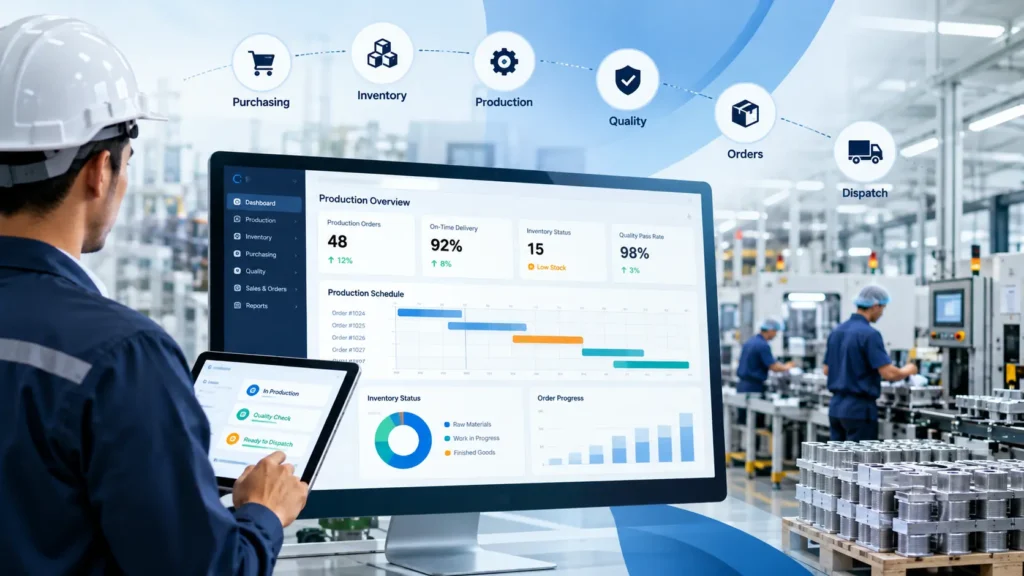
The company introduced a manufacturing ERP system to connect its purchasing, inventory, production, quality, sales, and dispatch activities through a shared operational platform.
Rather than treating every department as a separate unit, the system connected the information generated at each stage of the manufacturing process.
Production Planning and Scheduling
The system enabled planners to create production orders based on customer demand, material availability, routing requirements, and available production capacity.
When an order changed, planners could review the impact on material requirements and scheduled jobs before revising the production plan.
This helped the team identify potential bottlenecks earlier and coordinate production activities more effectively.
Inventory and Material Requirements Planning
The ERP system maintained centralized inventory records for raw materials, work in progress, and finished goods.
Material requirements could be calculated using production orders and bills of materials. The purchasing team could then identify shortages and plan procurement before materials became critical to production.
Where supported, barcode scanning and batch tracking could also improve stock movement accuracy.
Quality Management and Traceability
Quality checkpoints were integrated into relevant production stages. Inspection results, non-conformance records, corrective actions, and material batch details could be recorded against the appropriate production order.
This created a more structured way to investigate defects and retrieve production history when required.
Order Tracking and Dispatch
Customer orders were connected with production and inventory information. Sales and operations teams could use the same system to review order progress, pending operations, material availability, and dispatch readiness.
This reduced dependence on repeated manual status requests.
Management Reporting
Dashboards and reports brought key operational indicators into one place, including production order status, inventory levels, material shortages, rejection trends, and order fulfilment performance.
Managers could use this information to identify recurring issues and prioritize corrective action.
The Implementation Approach
The company followed a phased implementation approach to reduce disruption to its ongoing operations.
Phase 1: Process Assessment
The implementation team reviewed existing workflows, identified information gaps, documented business requirements, and mapped dependencies between departments.
Phase 2: System Configuration
Core modules for inventory, purchasing, production, quality, and sales were configured to reflect the company’s manufacturing processes. Where standard functionality was insufficient, additional customization requirements were documented.
Phase 3: Data Migration and Validation
Relevant item masters, bills of materials, supplier records, inventory balances, and open orders were cleaned, migrated, and validated before operational use.
Phase 4: Pilot Testing and Training
Selected production workflows were tested with actual business scenarios. Employees received role-based training, and issues identified during testing were resolved before broader rollout.
Phase 5: Go-Live and Continuous Improvement
The company introduced the system in stages, monitored operational performance, and refined reports and workflows based on user feedback.
Results: What Changed After Implementation?
The following outcomes illustrate the types of improvements a manufacturer might target after implementing an ERP system. They are examples for this hypothetical case study, not measured results from a real customer.
| Operational Area | Expected Improvement |
|---|---|
| Production scheduling | Better coordination of production jobs and machine capacity |
| Inventory management | Improved stock visibility and earlier identification of shortages |
| Quality management | Faster retrieval of inspection records and batch history |
| Order fulfilment | Better visibility into order progress and delivery risks |
| Purchasing | More informed material procurement decisions |
| Management reporting | More consistent operational data for decision-making |
The most important change was the availability of connected operational information. Instead of waiting for individual departments to prepare updates, managers could review shared records and identify problems earlier.
Actual improvements in production lead time, inventory carrying costs, rejection rates, and on-time delivery would need to be measured against a documented baseline after implementation.
Key Lessons for Manufacturing Businesses
This scenario highlights several important lessons for manufacturers considering ERP implementation.
1. Map the complete production process before choosing a system. Understand how customer orders, material procurement, production operations, inspection, and dispatch depend on one another.
2. Treat inventory accuracy as a priority. Production planning becomes less reliable when stock balances, material allocations, and work-in-progress records are inaccurate.
3. Connect quality with production. Quality records are more useful when they are linked to the relevant materials, batches, operations, and production orders.
4. Involve employees early. Production planners, machine operators, storekeepers, quality inspectors, and managers should participate in process design and testing.
5. Measure results using clear KPIs. Track indicators such as schedule adherence, inventory accuracy, production lead time, scrap rate, and on-time delivery before and after implementation.
Why Manufacturing Companies Need a Process-Focused ERP System
Manufacturing ERP is not simply about digitizing existing paperwork. Its value comes from connecting information and workflows across the factory.
When production schedules, inventory movements, purchasing activities, quality records, and customer orders operate through disconnected systems, delays and data inconsistencies become harder to identify.
An integrated solution provides a common operational view, helping teams coordinate decisions and respond to changing customer requirements.
However, every manufacturer has different needs. A discrete manufacturer producing engineered components may require bills of materials, routing, work-order tracking, and serial-number traceability. A process manufacturer may prioritize batch management, formulation control, and quality testing.
Selecting and configuring the right solution around actual business processes is therefore essential.
Conclusion
Manufacturing growth brings greater operational complexity. Without connected systems, increasing order volumes can create additional pressure on production planning, inventory management, quality control, and delivery performance.
A manufacturing ERP system can help address these challenges by bringing essential processes and operational information together. With appropriate implementation, employee training, and performance measurement, manufacturers can establish a stronger foundation for efficiency and future growth.
For manufacturers experiencing production delays, inconsistent inventory records, or limited operational visibility, evaluating their existing workflows is a practical first step toward improvement.
Looking for a Manufacturing ERP Solution?
Jurysoft helps businesses explore ERP solutions designed around their operational requirements, including production workflows, inventory management, quality processes, and business reporting.
Explore Jurysoft ERP Solutions to learn how a manufacturing ERP system can support your business processes.
Ready to improve your manufacturing operations? Start by identifying the production bottlenecks, material shortages, and reporting gaps that have the greatest impact on your business.