Many manufacturers run on a patchwork of tools: spreadsheets for inventory, a standalone accounting package, a whiteboard for the production schedule, and phone calls to fill the gaps. It works until the business grows. Then stock counts stop matching the shelf, a rush order disrupts planned jobs without anyone seeing the knock-on effect, and month-end reports take days because the data sits in five places.
These disconnects lead to inventory inaccuracies, production delays, reporting difficulties, and communication gaps between sales, purchasing, planning, and the shop floor. ERP software for manufacturing business operations addresses this by connecting those functions in a single system with shared, current data.
Choosing the right system matters because a poor fit is expensive to fix. This guide covers how to define requirements, evaluate features, match the software to your manufacturing model, compare deployment options, plan implementation, assess cost, and shortlist vendors.
1. Understand Your Manufacturing Business Requirements
Before comparing vendors, look closely at how your business runs today. Vendor demos are persuasive, and without a clear set of requirements it is easy to be drawn toward features you will never use while missing the ones you need.
Start with these areas:
- Operational bottlenecks: Where do jobs stall? Common culprits are material shortages, unclear priorities, and manual handoffs between departments.
- Production and inventory challenges: Note recurring problems such as stock discrepancies, excess raw material, missed delivery dates, or limited visibility into work in progress.
- Reporting and data management: List the reports your managers need and how long they take to produce today.
- Departmental integration: Identify which teams (production, purchasing, sales, quality, finance, warehouse) need to share data, and where information is currently re-entered by hand.
- Business goals and measurable outcomes: Decide what success looks like, such as fewer stockouts, shorter order-to-delivery cycles, or faster month-end close. Record your current baseline so you can compare later.
Involve people from the shop floor, not only management. A planner or storekeeper often knows exactly where the process breaks. The result should be a prioritized requirements list that separates must-haves from nice-to-haves, and that list becomes the yardstick for every vendor you evaluate.
Free resource: Manufacturing ERP Requirements Checklist. Not sure what to include in your requirements list? Download our Manufacturing ERP Requirements Checklist to document your workflows, pain points, and priorities before you speak with any vendor.
2. Evaluate the Essential Features of Manufacturing ERP Software
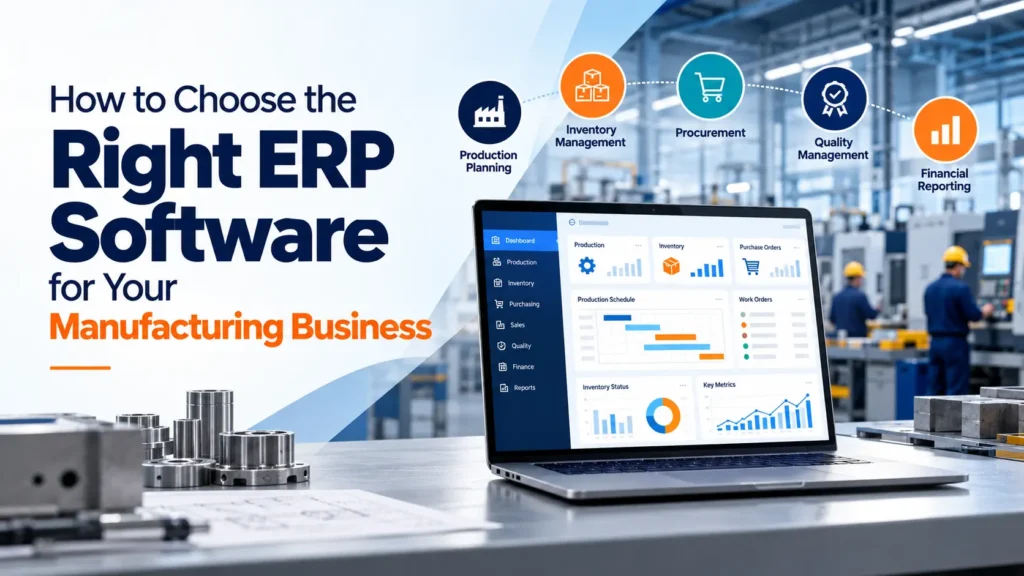
Not every ERP system handles production well. Generic business software may cover accounting and sales but lack the depth manufacturers need. These are the core capabilities to examine in any manufacturing ERP software.
Production Planning and Scheduling
Good production planning software turns demand into executable plans. Look for work order management, capacity planning, finite or rule-based scheduling, bills of materials, and real-time production tracking. The practical value is fewer surprises: planners can see which jobs are running, which are late, and how a new order affects the schedule.
Inventory and Warehouse Management
Inventory management ERP software should give live visibility into stock across locations, material availability against open work orders, and configurable reorder levels. Features such as bin-level warehouse tracking, batch or serial numbers, and cycle counting support inventory accuracy, which in turn helps prevent both stockouts and over-purchasing.
Procurement and Supply Chain Management
Purchasing should connect directly to production needs. Look for purchase requisitions and purchase orders, supplier records and performance history, and material planning that calculates what to buy and when based on demand and current stock.
Quality Management
Quality modules support incoming, in-process, and final inspections, defect recording, and corrective actions. Lot and batch traceability lets you trace a problem back to a supplier or production run. Over time, this data helps reduce scrap and rework.
Financial Management and Reporting
Manufacturers need to understand what jobs actually cost. Seek job or product costing, budgeting, and reporting that links material, labor, and overhead to financial results. Dashboards and reports for managers should draw from the same data as operations, not from separate spreadsheets.
Talk to an ERP specialist. Every plant has a different mix of production, inventory, and reporting challenges. If you would like an outside view on which capabilities matter most for yours, speak with an ERP specialist at Jurysoft to walk through your current workflows.
3. Choose ERP Software That Fits Your Manufacturing Model
An ERP system for manufacturers should follow how you actually make products, not force you into a generic process. Consider where your business sits:
- Make-to-order: Production starts after a customer order. You need strong quoting, order tracking, and accurate delivery date promising.
- Make-to-stock: Products are built to forecast. Demand forecasting, finished goods inventory control, and replenishment planning take priority.
- Discrete manufacturing: Products are assembled from countable parts. Multi-level bills of materials, routings, and engineering change control are important.
- Process manufacturing: Products involve formulas, batches, or continuous production. Look for recipe or formula management, yield tracking, and batch traceability.
- Multi-plant operations: Multiple facilities need inter-plant transfers, consolidated reporting, and consistent master data.
Many manufacturers combine models, such as stocking standard items while building custom ones to order. Make sure the system supports that mix.
Also consider your next three to five years. If you plan to add product lines, plants, or sales channels, the software should accommodate that growth without a costly replacement. Ask vendors to demonstrate workflows from your own industry rather than relying on feature lists.
4. Compare Cloud ERP and On-Premise ERP
Both deployment models are used successfully in manufacturing. The right choice depends on your circumstances.
- Initial investment and ongoing costs: Cloud ERP typically uses a subscription with lower upfront spend, while on-premise often involves license purchases and hardware, with maintenance costs over time. Compare total cost over several years, not just the first invoice.
- Accessibility: Cloud systems are accessible from any location with internet access, which suits multi-site teams. On-premise access is usually tied to your network unless you configure remote access.
- Infrastructure and maintenance: With cloud, the provider generally handles servers and updates. On-premise requires your IT team to manage hardware, backups, and upgrades.
- Security: Both can be secure when properly managed. Ask who is responsible for security, backups, and recovery, and whether this meets your compliance requirements.
- Scalability: Cloud usually scales more easily by adding users or modules. On-premise scaling may require additional hardware planning.
- Customization and integration: On-premise can offer more control over deep customization, while cloud platforms vary in their flexibility. Check how each option connects to machines, scanners, and existing software.
Also consider internet reliability at your plant and your internal IT capacity. No option is universally better, so match the model to your needs and ask vendors to explain trade-offs openly.
5. Consider ERP Implementation, Integration, and Support
A strong product can fail through weak ERP implementation. Plan for these elements early:
- Data migration and validation: Item masters, bills of materials, supplier records, and opening stock must be cleaned before loading. Validate the migrated data against real records, since errors here undermine trust in the system.
- Employee training: Train people by role, using your own workflows and data where possible.
- Change management: Explain why the change is happening and what it means for each team. Resistance usually comes from uncertainty, not from the software.
- Integration with existing systems: Identify what must connect, such as accounting tools, CAD or PLM software, barcode scanners, or e-commerce platforms, and confirm how each integration will work.
- Implementation planning: Define scope, responsibilities, milestones, and testing. Many manufacturers phase rollouts by module or plant to limit disruption.
- Vendor support: Ask what help is available after go-live, including response channels, ongoing training, and upgrades.
A clear plan reduces disruption on the production floor and improves adoption, because users see the system working with their processes rather than against them.
6. Calculate the Total Cost and Expected ROI of ERP Software for Your Manufacturing Business
The license or subscription fee is only one part of the cost. To estimate total cost of ownership, request itemized quotes covering:
- Software licensing or subscription fees
- Implementation and customization
- Training and data migration
- Integrations and any required hardware
- Maintenance, support, and upgrades
On the benefit side, identify where the system could create value for your business. Examples include:
- Time saved on manual data entry and reporting
- Improved planning and scheduling productivity
- Better inventory accuracy and reduced excess stock
- Fewer production interruptions from material shortages
- Visibility into job costs and margins
Use the baseline metrics from your requirements work, such as inventory accuracy, on-time delivery, stockout frequency, and reporting time. After go-live, track the same measures. Be cautious with any vendor projecting specific savings, since results depend on your processes, data quality, and how well the system is adopted. ROI is something you measure against your own baseline, not a number to accept on trust.
7. Common Mistakes to Avoid When Selecting ERP Software
- Choosing based only on price. A low quote can hide costs for customization, integrations, or support. Compare total cost of ownership.
- Ignoring actual business requirements. Score every vendor against your prioritized list, not against their strongest features.
- Overlooking integration capabilities. Confirm in writing how the ERP will connect to systems you already rely on.
- Underestimating employee training. Budget time and money for role-based training and follow-up support.
- Failing to evaluate vendor support. Ask for details about support channels, response expectations, and ongoing assistance, and speak with reference customers where possible.
- Not defining measurable success criteria. Agree on specific targets before the project begins so you can judge results objectively.
8. ERP Vendor Evaluation Checklist
Save this list and use it for every vendor on your shortlist.
- Does the ERP system support our manufacturing processes (make-to-order, make-to-stock, discrete, process, multi-plant)?
- Can it connect production, inventory, purchasing, sales, and finance in one system?
- Does it provide production planning, scheduling, and shop floor tracking that match how we work?
- Does it offer lot or serial traceability and quality management features we need?
- Can it scale as our products, users, and plants grow?
- Which deployment options are available, and what are the cost and maintenance implications of each?
- How does it integrate with our existing systems and equipment?
- What implementation and support services are included, and what costs extra?
- Can the vendor demonstrate relevant manufacturing workflows using our own scenarios?
- What training and onboarding are available for each user role?
- Can we speak with manufacturers of similar size and type?
- How will we measure implementation success?
Conclusion: Make an Informed ERP Decision
The best ERP software selection process starts with your own requirements, then tests each vendor on essential features, fit with your manufacturing model, deployment approach, implementation support, and total cost. Plan for growth so the system you choose still works as your operations expand.
Jurysoft works with manufacturers to explore ERP requirements and map them to practical solutions. If you are comparing options or replacing disconnected tools, our team can help you clarify your needs.
Looking for the right ERP solution for your manufacturing business? Contact Jurysoft to discuss your requirements and request a free ERP Gap Audit.
Frequently Asked Questions
What features should manufacturing ERP software include?
At minimum: production planning and scheduling, inventory and warehouse management, procurement, quality management, and financial reporting, all sharing one database. Additional needs depend on your manufacturing model, such as batch traceability or multi-plant support.
How much does ERP software cost for manufacturers?
Cost varies with the number of users, modules, deployment model, customization, integrations, data migration, and training. Request itemized quotes and compare total cost of ownership rather than license fees alone.
How long does manufacturing ERP implementation take?
There is no fixed timeline. Duration depends on project scope, process complexity, data quality, integrations, and how many plants or modules are included. A detailed implementation plan from the vendor will give you a realistic schedule.
How can a manufacturing business choose the right ERP vendor?
Define requirements first, then shortlist vendors with relevant manufacturing experience. Request demonstrations of your own workflows, compare total cost and support, check references, and score each vendor with the checklist above