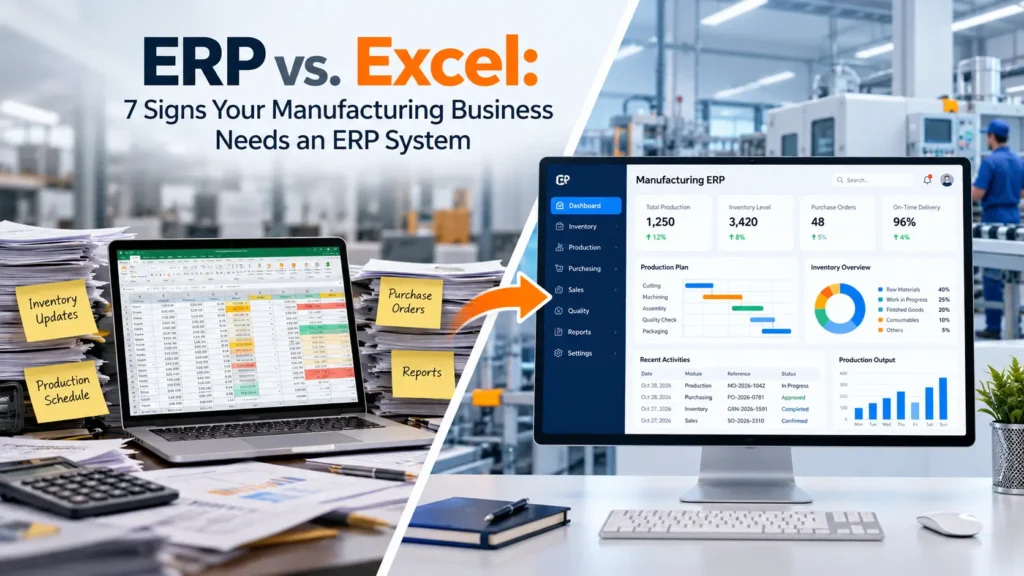
It is month-end at a mid-sized fabrication unit. The stores team has one spreadsheet for raw materials, production has another for job schedules, purchasing keeps a third for open purchase orders, and finance builds costs in a fourth. Nobody is careless, yet the numbers never quite match. Someone spends two days reconciling files before management can see a single report.
This is the heart of the ERP vs Excel question. Spreadsheets are excellent for calculations and small, contained tasks. But as order volumes, product variants and departmental dependencies grow, they become hard to keep accurate and consistent. An ERP system connects manufacturing processes and keeps business information in one shared place.
In this article you will learn how Excel and ERP differ, seven practical signs it may be time to evaluate ERP software for your manufacturing business, when spreadsheets are still perfectly fine, and how to approach the transition.
ERP vs. Excel: Understanding the Key Differences
Excel is a flexible, individual-level tool. It handles calculations, small datasets, quick analysis and one-off tracking very well, and almost every employee already knows how to use it. For a ten-person workshop with a handful of products, a well-built spreadsheet can run quite effectively.
An ERP system is a different kind of tool. Rather than a standalone file, it is an integrated business management platform that links functions such as inventory, production, purchasing, sales and finance, and lets them share operational records. When a goods receipt is posted, for example, the relevant inventory and purchasing information can update within the same system instead of being retyped elsewhere.
The differences show up in daily work:
- Manual updates vs. integrated workflows. In Excel, someone must update each file. In ERP, a transaction can flow through connected steps.
- Spreadsheet reporting vs. system-generated reports. Excel reports usually involve consolidating several files. ERP reports draw on integrated data, although how current they are depends on how the system is configured and used.
- Files vs. a platform. Spreadsheets depend on file sharing and version control. ERP typically adds role-based access and shared workflows, depending on the system.
| Business Function | Excel-Based Approach | ERP-Based Approach |
|---|---|---|
| Inventory | Manual spreadsheet updates | Integrated inventory records and transaction tracking |
| Production | Separate schedules and files | Connected production planning and tracking |
| Purchasing | Manually maintained purchase records | Integrated purchasing and material information |
| Reporting | Consolidation of multiple files | Reports generated from integrated business data |
| Collaboration | File sharing and version management | Role-based access and shared workflows, depending on the system |
Neither approach is automatically right. The better fit depends on how complex your operations are and how many people depend on the same data.
CTA 1: Is your spreadsheet setup still keeping up? If you are unsure whether your current spreadsheets adequately support your inventory, production and reporting needs, a structured review can help. Download our Manufacturing Process Assessment Checklist to compare your current workflows against common areas where manufacturers outgrow spreadsheets, and decide whether an ERP evaluation is worthwhile. [Insert download link / form]
7 Signs Your Manufacturing Business Needs an ERP System
Not every business shows all seven signs, and one sign alone does not mean you must replace Excel. But if several sound familiar, it is worth looking at ERP software for manufacturers more seriously.
1. Inventory Records Frequently Contain Errors
When stock is tracked by hand, small mistakes accumulate: duplicate entries, receipts logged a day late, issues to production that were never recorded. Over time the spreadsheet says you have 400 units of a component while the shelf holds 310. That gap leads to stockouts that halt a production line, or to overstocking that ties up cash.
The problem compounds with raw materials, work-in-progress and finished goods tracked in separate sheets, and with multiple warehouses where each location keeps its own file.
An appropriately configured inventory management ERP software can keep stock transactions in a single record, tie movements to receipts, issues and dispatches, and give teams better visibility across locations. Inventory accuracy still depends on disciplined posting and good master data, but the system gives you a structure to enforce it.
2. Production Planning Has Become Difficult
Production schedules kept in separate spreadsheets are hard to keep current. A customer changes a delivery date, a machine goes down, a supplier delays a shipment, and suddenly several files need manual revision. Planners often cannot see at a glance whether materials are available, whether machine and labor capacity allow the schedule, or which orders will slip.
The result is production delays and constant phone calls between planning, purchasing and the shop floor.
Manufacturing ERP software can connect production orders with material planning, bills of materials and other operational data, so planners work from the same information as purchasing and stores. Good production planning software does not remove all disruption, but it makes the impact of a change easier to see and coordinate.
3. Employees Spend Too Much Time on Manual Data Entry
If the same sales order is typed into a planning sheet, a dispatch sheet and an invoicing file, you are paying skilled people to copy data. Repeated entry, manual calculations, updating several files and cross-checking figures consume hours every week, and each retyping is another chance for error.
ERP automation can reduce this where the system supports it. When records are integrated, information entered once can be reused across workflows such as purchasing, inventory and invoicing. Automation will not fix poor data, but it can shift staff time from re-keying and checking toward analysis and exception handling.
4. Generating Accurate Reports Takes Too Long
A plant manager wants to know order status, material consumption and on-time delivery. Getting there means collecting figures from production, inventory, sales and finance files, then reconciling the differences. By the time the report is ready, it may already be out of date.
Typical symptoms include delayed management reports, conflicting numbers between departments, painful month-end closing, limited operational visibility and difficulty spotting performance issues early.
ERP reporting can give decision-makers more consistent information because reports draw on connected business functions rather than separately maintained files. The quality of the output still depends on timely and accurate data entry, but one shared source reduces the arguments about whose number is right.
5. Departments Work with Disconnected Information
Production, procurement, inventory, sales and finance often keep their own records. Sales promises a delivery date without seeing material shortages. Purchasing reorders items that stores already have. Finance sees costs weeks after they occur.
These gaps create communication delays, duplicated work and inconsistent information, and they make coordination slow.
Integrated ERP workflows allow departments to work from shared business records while access permissions control who can see or change what. A sales user can check availability, a buyer can see demand, and finance can see transactions without waiting for someone to email a file.
CTA 2: Talk through your operational bottlenecks with an ERP specialist If these signs sound familiar, a short conversation can help clarify where the biggest gaps are. Review your inventory, production planning, reporting and cross-department coordination challenges with an ERP specialist at Jurysoft, and get a clearer view of what to prioritise when evaluating ERP options. [Insert consultation request link]
6. Tracking Production Costs and Waste Is Difficult
Spreadsheets become cumbersome when you try to follow material consumption, labor, overheads, scrap, rework and variances across many production orders. Costs end up estimated or calculated after the fact, and it is hard to trace which batch used which material lot.
Accurate cost information and production traceability matter for pricing, margin analysis, quality investigations and customer audits.
An appropriately configured manufacturing ERP system can consolidate relevant data on materials, labor and production orders to support better cost analysis and operational decisions. It is important to be realistic: ERP alone will not eliminate waste or guarantee cost savings. It gives you better data, and it is up to your teams to act on it.
7. Your Business Is Growing Faster Than Your Processes
A spreadsheet that worked for 50 orders a month may struggle at 500. Growth brings more products and production orders, higher transaction volumes, additional warehouses or plants, more employees, approval requirements and greater reporting and integration needs.
When processes depend on a few people who know how “the sheet” works, growth becomes risky. Files break, formulas get overwritten and knowledge walks out the door.
ERP software can support standardised processes, defined approval flows and more scalable operations when it is implemented carefully. The goal is to let your systems grow with the business rather than forcing people to work around them.
ERP vs. Excel: When Should You Make the Switch?
There is no universal point at which every business must replace Excel. Spreadsheets remain appropriate for simple calculations, small standalone tasks, ad hoc analysis and temporary tracking.
ERP becomes worth evaluating when:
- Multiple departments need connected data.
- Inventory and production records frequently conflict.
- Manual reporting creates delays.
- Business processes are becoming difficult to coordinate.
- You need stronger traceability and workflow controls.
It also helps to remember that ERP and Excel can complement each other. Many manufacturers keep using spreadsheets for analysis, modelling and specialised tasks while the ERP manages core transactions. The question is not whether Excel is good or bad, but whether it is still the right tool for your core operational records.
How to Transition from Excel to Manufacturing ERP Software
A successful move is mostly about preparation. A practical outline:
- Assess existing spreadsheets and workflows. Map what files exist, who owns them and how data moves between them.
- Identify data quality issues. Find duplicate items, inconsistent units and redundant records before migrating anything.
- Document essential requirements. Capture the processes the system must support, from production routing to approvals.
- Select an ERP system suitable for your manufacturing model. Discrete, process and make-to-order operations have different needs.
- Plan data migration, testing and integration. Decide what to migrate, test with real scenarios and plan links to other tools.
- Train employees and assign responsibilities. Adoption is one of the biggest factors in success.
- Monitor performance after go-live. Review issues, refine configuration and track whether the original problems are improving.
Depending on business complexity and project scope, a phased implementation, such as starting with inventory and purchasing before adding production planning, may be more manageable than switching everything at once.
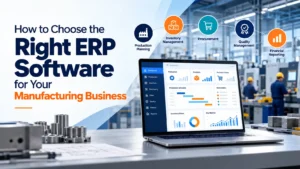
How to Choose the Right ERP Software for Your Manufacturing Business
When comparing options for an ERP system for manufacturing, look beyond the brochure and evaluate how well the software fits your operations. Key criteria include:
- Production planning and scheduling
- Inventory and warehouse management
- Purchasing and supply chain workflows
- Quality management and traceability
- Financial reporting and cost visibility
- Integration capabilities
- Scalability and usability
- Implementation services and ongoing support
Ask vendors for a product demonstration built around your actual workflows, such as a real production order, a material shortage or a month-end report, rather than relying on a feature list or price alone. The best manufacturing management software is the one your team will actually use consistently.
Conclusion: Move Beyond Spreadsheet Limitations with the Right ERP System
The seven signs are error-prone inventory records, difficult production planning, heavy manual data entry, slow reporting, disconnected departments, hard-to-track costs and waste, and growth outpacing your processes. Whether to adopt ERP should depend on your operational complexity, business requirements and expected value, not on a trend.
If you are exploring ERP software for your manufacturing business, Jurysoft is one option to consider as a partner for evaluating integrated ERP solutions.
CTA 3: Still managing manufacturing operations through spreadsheets and disconnected systems? Request a free ERP Gap Audit from Jurysoft to identify process gaps and explore opportunities to improve operational visibility. [Insert ERP Gap Audit request link]
Frequently Asked Questions
1. Is ERP better than Excel for manufacturing businesses? For managing connected processes such as inventory, production, purchasing and reporting, ERP is generally better suited because it shares records across departments. For simple calculations and ad hoc analysis, Excel remains useful. The right choice depends on your complexity and size.
2. Can Excel and ERP software be used together? Yes. Many manufacturers keep Excel for analysis, modelling and specialised tasks while the ERP handles core transactions. Most ERP systems can export or exchange data with spreadsheets, though capabilities vary by product.
3. What are the main disadvantages of managing manufacturing operations with spreadsheets? Common issues include data entry errors, version conflicts, limited visibility across departments, slow reporting and difficulty tracing materials and costs as volumes grow. Spreadsheets also depend heavily on individual users.
4. When should a manufacturing company switch from Excel to ERP software? There is no fixed point. Consider evaluating ERP when departments need connected data, inventory and production records conflict, reporting is delayed or coordination and traceability are becoming difficult.