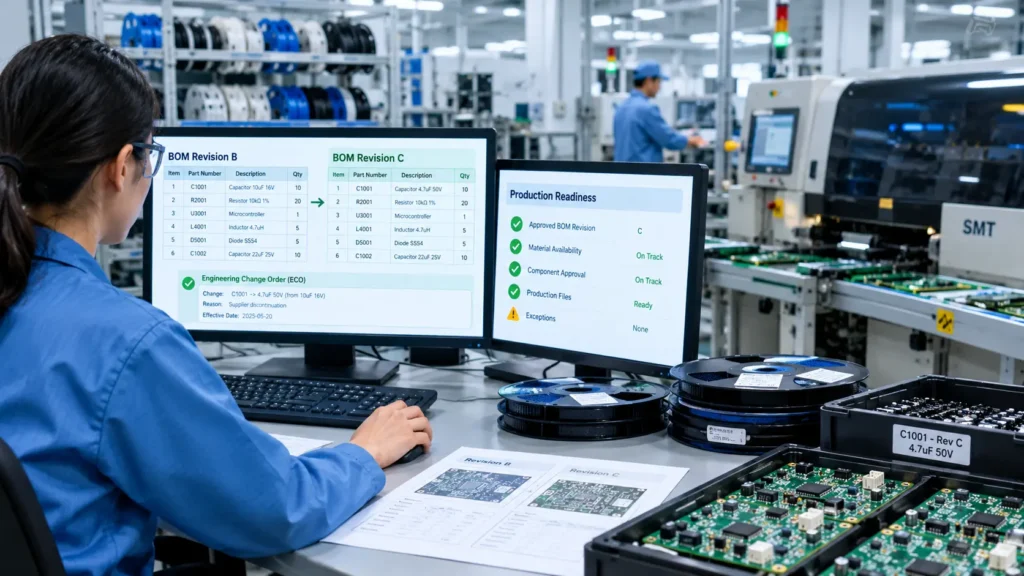
When Engineering Changes Faster Than Production
A PCB assembly order is scheduled for Monday morning. The engineering team has released Bill of Materials (BOM) Revision C, but purchasing has already ordered components against Revision B. The warehouse has picked materials using the earlier parts list, and the surface-mount technology (SMT) line is prepared to begin production.
Then the production engineer notices that one component has changed.
The revised BOM specifies a different capacitor package. The old component is already in stock, but it may not be compatible with the updated PCB design. Purchasing has placed another order, while the planning team still considers the original production schedule achievable.
The result is a familiar electronics manufacturing problem: production stops while teams determine which BOM is correct, which components can be used, and whether the order can proceed without compromising product quality.
This delay is not necessarily caused by a shortage of components. It can result from a disconnect between engineering revisions, purchasing commitments, warehouse allocation, and production instructions.
For PCB manufacturers handling frequent engineering changes, multiple product variants, or customer-specific assemblies, controlling these handoffs is essential. PCB BOM management software integrated with manufacturing ERP can help ensure that approved revisions reach the right teams and that material readiness is checked against the correct version before production begins.
The objective is straightforward: prevent an engineering change from becoming an avoidable production delay.
1. Why PCB BOM Revision Mismatches Happen
A PCB BOM identifies the components required to assemble a particular board. Depending on the product, it may include manufacturer part numbers, internal item codes, quantities, approved alternatives, reference designators, and revision information.
The challenge begins when these details change but the associated manufacturing processes do not update consistently.
Engineering Files Are Maintained Separately
Engineering may release a revised BOM through CAD tools, spreadsheets, or a product data management system. Purchasing might still use an earlier spreadsheet, while the warehouse works from a printed picking list.
Even when the latest file exists, employees may not know whether it has been formally approved for production.
Purchasing Has Already Committed to the Old BOM
An engineering change can arrive after purchase orders have been issued. Some components may be on order, others may have arrived, and some may be non-cancellable or subject to minimum order quantities.
Without a clear impact assessment, purchasing cannot easily determine which commitments need to be cancelled, revised, returned, or retained for another product.
Work Orders Contain Outdated Instructions
A production order may have been created before the new BOM was approved. If the order is not updated or explicitly assessed, material picking and SMT programming may continue using obsolete information.
Component Substitutions Are Not Controlled
Electronics manufacturers often use alternate components to manage shortages and lead times. However, a substitute that appears similar in a distributor catalogue is not automatically acceptable.
Differences in package dimensions, electrical ratings, tolerances, temperature characteristics, or qualification requirements can affect the finished assembly.
A controlled process must distinguish between an approved alternate and an unverified replacement.
2. What Happens When Production Uses the Wrong BOM Revision?
A revision mismatch can create costs across several stages of PCB manufacturing, even if the error is detected before the finished product reaches the customer.
Incorrect SMT Component Placement
A component package or reference designator may differ between revisions. If the production setup uses outdated placement data, the board may require correction or rebuilding.
Material Shortages Despite Available Inventory
The warehouse may show sufficient stock overall, but the available quantity may belong to an obsolete revision, an unapproved substitute, or a batch that cannot be allocated to the current order.
Rework, Scrap, and Quality Investigations
If the mismatch is discovered after assembly, quality teams may need to quarantine boards, inspect affected serial numbers, assess rework requirements, and document the disposition.
Missed Dispatch Commitments
Production planners must revise machine schedules, coordinate with purchasing, and communicate new delivery dates. Other orders may also be delayed when shared components or production capacity are reassigned.
The underlying issue is that a BOM revision is not merely a document update. It can change material requirements, purchasing decisions, machine setup, inspection criteria, and delivery commitments.
3. How ERP Should Manage an Engineering Change Order
An engineering change order (ECO) provides a controlled way to propose, review, approve, and release changes to a product definition.
For PCB manufacturers, the ECO workflow should connect the engineering decision to its operational consequences.
Step 1: Record the Proposed Change
The engineering team creates a change request describing the affected PCB, current revision, proposed revision, reason for the change, and impacted components.
For example, a capacitor may be replaced because the original manufacturer has discontinued it. The ECO should identify the old and proposed part numbers, technical differences, and supporting documentation.
Step 2: Assess Operational Impact
Before approval, the responsible teams review the change:
- Engineering verifies electrical, mechanical, and design compatibility.
- Quality assesses validation, inspection, and customer approval requirements.
- Purchasing checks supplier commitments, lead times, and existing orders.
- Inventory control identifies stock on hand, allocated quantities, and incoming materials.
- Production planning identifies affected work orders and scheduled assembly dates.
An ERP system should make these dependencies visible rather than requiring every team to reconstruct the impact from separate spreadsheets.
Step 3: Approve the Change and Define Its Effective Point
The ECO should record who approved the change, when it was approved, and when the revised BOM becomes effective.
The effective point may be a specific work order, production lot, serial-number range, or future production date. This distinction matters because not every engineering change should automatically invalidate work already in progress.
Where customer approval or regulatory validation is required, the system should prevent release until the necessary approvals are recorded.
Step 4: Release the Correct Revision
Once approved, the revised BOM should become the authorised production reference. Related work orders, material requirements, picking instructions, and relevant inspection documentation should be updated or flagged for review.
A robust workflow should also prevent an older revision from being released accidentally for new production.
Revision control must extend beyond the BOM file. The approved production package may also include assembly drawings, pick-and-place data, stencil requirements, test instructions, and inspection criteria.
4. How to Manage Components Already Purchased Under the Previous Revision
One of the most difficult parts of an ECO is deciding what to do with materials already in the supply chain.
Suppose Revision B requires 10,000 capacitors, but Revision C replaces that component. The factory has 3,000 units in stock, 4,000 on order, and 3,000 already allocated to other production orders.
A simple stock balance cannot answer whether the factory is ready to build Revision C.
An effective process should distinguish four categories.
| Material Status | Required Action |
|---|---|
| Unused stock | Verify compatibility and approved usage before reallocating or retaining it. |
| Allocated stock | Identify affected work orders and release or reassign material through an authorised process. |
| Incoming purchase orders | Review cancellation, supplier amendment, return, or future-use options. |
| Approved alternatives | Verify engineering approval, applicable specifications, and lot or batch requirements before allocation. |
ERP should support these decisions with traceable inventory transactions and links to the relevant ECO.
For components that are no longer approved, the system should support quarantine or restricted-use status where appropriate. For acceptable legacy components, engineering may authorise continued use under a defined effective-date or lot-based policy.
This avoids two costly extremes: using an incompatible component simply because it is available, or discarding usable inventory without a technical assessment.
5. Verify Production Readiness Before Releasing a PCB Order
Production readiness should be a decision based on the exact BOM revision, not a general statement that the warehouse has enough components.
Before releasing a PCB work order, the ERP workflow should validate the following areas.
Approved BOM and Revision
Confirm that the work order references the authorised revision and that no unresolved ECO affects the planned production quantity.
Net Material Availability
Calculate required quantities against usable on-hand stock, existing allocations, incoming supply, expected scrap, and any applicable safety stock rules.
Component Approval and Traceability
Check approved manufacturer part numbers, substitute permissions, lot restrictions, and other product-specific quality requirements.
Production Setup and Quality Requirements
Confirm that the correct assembly files, machine programs, inspection plans, and test procedures are available for the released revision.
Exception Ownership
Assign shortages, approval gaps, and revision conflicts to named owners with clear actions and deadlines.
Material planning should distinguish between physical stock and usable, unallocated stock. It should also account for component quantities per board, planned production quantity, and expected process losses where applicable.
For example, if an assembly requires 12 of a particular component per board and the planned lot is 500 boards, the gross requirement is 6,000 units before any additional allowance for scrap or process loss. If only 4,800 units are available for allocation, the order has a 1,200-unit shortfall before those allowances are considered.
That shortfall should be visible before the production order is released, allowing purchasing and planning teams to respond early.
6. Practical Example: Tracking a Component Change from Engineering to Final Inspection
Consider a hypothetical PCB manufacturer producing 500 control boards for an industrial electronics customer.
The original BOM, Revision B, specifies Component X. Engineering then releases Revision C, replacing Component X with Component Y because of a supplier discontinuation.
The following example illustrates how a revision-controlled ERP workflow can prevent the change from disrupting production unnecessarily.
Stage 1: Engineering Approves Revision C
The ECO identifies Component X, the replacement Component Y, the reason for the change, and the required technical validation. Quality and any required customer approvals are completed before release.
Stage 2: Inventory and Purchasing Assess the Impact
The ERP identifies 2,000 units of Component X in stock and another 4,000 on order. Engineering confirms whether the existing stock can be used for previously authorised production. Purchasing contacts the supplier about amending the outstanding order.
Stage 3: Production Planning Checks Material Readiness
For the 500-board order, planning verifies the total requirement for Component Y, checks available and incoming quantities, and identifies any shortfall. The order is released only when the applicable material and production requirements are satisfied or an authorised exception is approved.
Stage 4: SMT Production Uses the Correct Revision
The line receives the authorised BOM and corresponding assembly instructions. Material issue transactions record the actual component lots or reels used, according to the manufacturer’s traceability requirements.
Stage 5: Inspection Closes the Production Record
Inspection and testing follow the applicable revision’s requirements. If a quality issue occurs, the manufacturer can trace the affected production records and component lots to support investigation and corrective action.
The benefit is not that every engineering change becomes disruption-free. It is that the factory can identify the impact earlier, make informed decisions, and avoid discovering a revision conflict after the SMT line has started.
7. ERP Implementation Checklist for PCB BOM Revision Control
Electronics manufacturers evaluating PCB BOM management software should assess whether the system supports the following operational requirements.
Engineering Change Management
- Unique ECO records with reason, owner, approval history, and effective date.
- Revision-controlled BOMs with controlled release and access permissions.
- Impact assessment for open work orders and existing production lots.
Purchasing and Inventory
- Visibility into on-hand, allocated, quarantined, and incoming components.
- Supplier purchase order review following approved BOM changes.
- Controlled alternate-component approval and usage restrictions.
Production Planning and Execution
- Material requirement recalculation after a BOM change.
- Revision validation before work order release and material picking.
- Access to current assembly instructions and relevant machine programs.
Quality and Traceability
- Component lot, reel, or serial tracking where required.
- Inspection records linked to the relevant product revision.
- Documented handling of nonconforming material, rework, and affected boards.
Reporting and Accountability
- A dashboard of unresolved ECOs and affected production orders.
- Named owners and deadlines for material and approval exceptions.
- Audit trails for BOM updates, material issues, and production release decisions.
Use this checklist during ERP selection or process reviews. Not every manufacturer needs the same level of serialisation or engineering integration, so requirements should reflect product complexity, customer obligations, and traceability needs.
8. How to Measure Whether BOM Revision Control Is Improving
Implementing a workflow is only the first step. Manufacturers should track whether it reduces avoidable production interruptions.
Useful indicators include:
- Revision-related production holds: Number of work orders stopped because of incorrect or unresolved BOM revisions.
- ECO implementation time: Time between change approval and completion of the required updates across purchasing, inventory, and production.
- Material readiness at release: Percentage of work orders that meet defined material and approval requirements before production starts.
- Rework attributable to revision errors: Number of boards or production lots requiring corrective action because an outdated specification was used.
- Component obsolescence exposure: Value or quantity of inventory affected by engineering changes, reported by disposition status.
Establish a baseline before implementation and review the same indicators afterward. This helps distinguish genuine process improvements from changes caused by production volume, product mix, or supplier performance.
Conclusion: Connect Engineering Changes to Shop-Floor Decisions
PCB production delays caused by BOM revision mismatches are rarely isolated engineering problems. They arise when a change to the product definition fails to reach purchasing, inventory, production planning, and quality control at the right time.
A well-configured manufacturing ERP can connect these activities through revision-controlled BOMs, structured ECO approvals, material availability checks, controlled substitutions, and production traceability.
For electronics manufacturers, the goal is to ensure that every production order has a clear, authorised specification and that material decisions reflect that specification before assembly begins.
Rather than discovering a mismatch at the SMT line, teams can identify the impact while the change is still being evaluated.
Is Your Current System Ready for Engineering Changes?
If BOM revisions, component shortages, disconnected purchasing records, or production holds are affecting your factory, a structured ERP review can help identify where information and processes break down.
Jurysoft provides industry-specific ERP development for manufacturing operations, with scope tailored to business workflows and integration requirements.
A Free ERP Gap Audit can help you assess:
- How engineering changes reach purchasing and production.
- Whether material allocation reflects the approved BOM revision.
- Where manual handoffs create production-readiness risks.
- Which workflow or system integrations should be prioritised.
Request a Free ERP Gap Audit to evaluate your current manufacturing processes and identify opportunities to improve revision control and production readiness.
Start here: https://jurysoft.com/erp/free-erp-gap-audit/
Explore Jurysoft’s ERP solutions: https://jurysoft.com/erp/