Why Production Bottlenecks Are Difficult to Identify
A manufacturing line can fall behind schedule even when most machines appear to be operating normally. One delayed inspection, an unexpected material shortage, or a machine that consistently produces below its expected capacity can affect the entire production schedule. As unfinished orders accumulate, dispatch deadlines become harder to meet, overtime increases, and production teams struggle to recover lost time.
The challenge is not always recognising that a delay exists. It is identifying exactly where the delay begins and understanding why it keeps happening.
Many manufacturers rely on spreadsheets, shift reports, machine logs, and separate inventory records to monitor production. Although these records provide useful information, they may not reveal how problems in one department affect the performance of another. A production manager might see that an order is delayed without knowing whether the cause is insufficient machine capacity, unavailable materials, repeated quality failures, or excessive waiting between operations.
Manufacturing ERP software helps connect production schedules, work-centre activity, material availability, inventory movements, and quality records. When these records are updated consistently, manufacturers can compare planned performance with actual results and investigate recurring delays using operational data rather than assumptions.
The objective is not simply to increase machine utilisation. It is to identify the constraint limiting overall production output and take corrective action.
What Is a Production Bottleneck in Manufacturing?
A production bottleneck occurs when a machine, process, workstation, or operational resource cannot handle the required production volume within the available time. Because downstream activities depend on its output, the constrained stage limits the throughput of the entire production process.
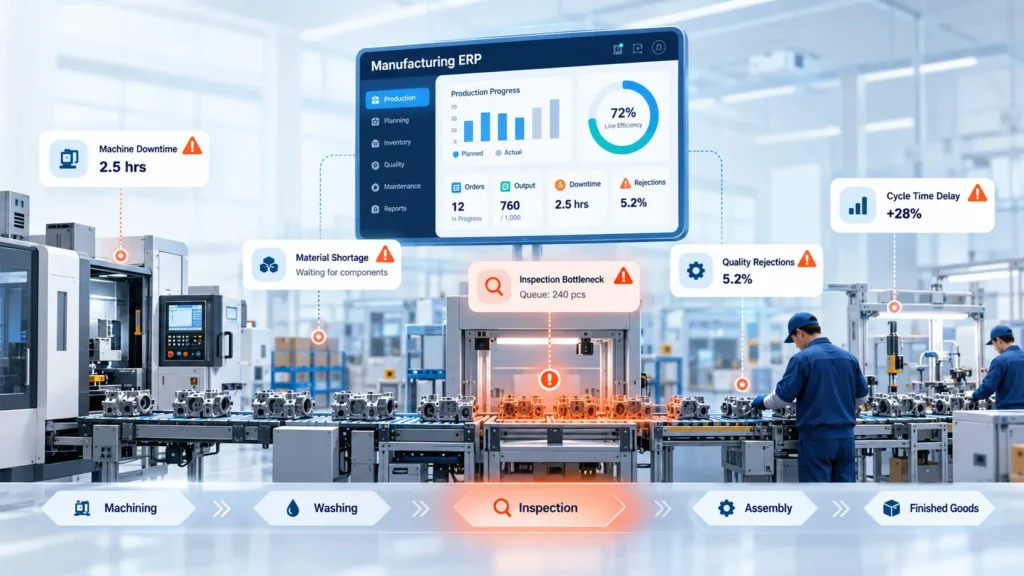
Consider an automotive components manufacturer with machining, washing, inspection, and assembly operations. If machining produces 1,000 components per shift but the inspection department can process only 750, unfinished components accumulate before inspection. Assembly may then experience shortages even though sufficient components have already been machined.
Other common examples include:
- Machine capacity constraints: A machining centre cannot produce enough parts to meet the assembly schedule.
- Inspection delays: Quality checks take longer than planned, preventing approved components from moving forward.
- Material shortages: Production stops because a required raw material or component is unavailable.
- Frequent changeovers: Repeated tooling changes and machine setups reduce the time available for production.
Not every delay represents a permanent bottleneck. A temporary supplier delay or unexpected machine breakdown may interrupt production for a short period. A recurring bottleneck, however, repeatedly limits throughput under normal operating conditions.
Distinguishing between these situations is important. Temporary disruptions may require immediate recovery measures, while recurring constraints often need changes to capacity planning, maintenance, inspection resources, scheduling, or production methods.
Why Traditional Production Tracking Often Misses the Root Cause
Traditional production tracking can show that targets were missed without explaining why. This happens when operational data is incomplete, delayed, or spread across disconnected systems.
Five common issues make bottleneck analysis difficult.
1. Production updates are recorded at the end of a shift. When operators enter completed quantities hours after production, managers may discover a delay too late to adjust the schedule.
2. Planned and actual output are not compared consistently. A report might show total production for the day but fail to identify which machine, shift, or production order fell behind.
3. Downtime records lack meaningful reason codes. Recording that a machine stopped is less useful than distinguishing between equipment failure, tooling problems, material waiting time, and changeover delays.
4. Material shortages are tracked separately. Procurement may know that a component is delayed, while production planning continues to schedule orders that depend on it.
5. Rework and rejection losses are overlooked. A machine might meet its gross production target, but rejected components reduce the number of usable parts available for the next operation.
These problems create a gap between reported activity and actual production performance.
Identifying the symptom is only the first step. Effective bottleneck analysis requires connecting output losses with the operational events that caused them. Manufacturing ERP can support this investigation by bringing relevant records into a common reporting environment.
Six ERP Data Points That Help Identify Production Bottlenecks
A properly configured manufacturing ERP system can help production teams examine several related indicators rather than relying on a single performance measure.
4.1 Planned vs. Actual Production Output
Production output is one of the first indicators to examine. Compare the scheduled quantity with the actual completed quantity for each production order, machine, work centre, and shift.
For example, if a work centre is expected to produce 500 components per shift but regularly completes only 380, the difference warrants investigation.
The next step is to determine whether the shortfall results from downtime, slower cycle times, material waiting, quality failures, or unrealistic production targets.
Comparing output across multiple shifts can also reveal whether the problem occurs throughout the day or only during specific operating periods.
4.2 Machine Downtime and Utilisation
Machine downtime measures how much scheduled production time is lost when equipment cannot operate. ERP-linked maintenance and shop-floor records can help teams examine downtime frequency, duration, recorded causes, and maintenance history.
Repeated short stoppages may create significant capacity losses even when no individual incident appears serious. Similarly, a machine with frequent breakdowns may require preventive maintenance or a review of its operating conditions.
Utilisation should be interpreted carefully. A machine can show high utilisation while producing unnecessary inventory or working ahead of a downstream constraint. The goal is to understand whether machine availability supports the required production flow.
4.3 Work-in-Progress Accumulation
Work-in-progress (WIP) refers to materials and components that have entered production but have not yet become finished goods.
When WIP repeatedly accumulates before a particular operation, it can indicate that the operation cannot process incoming work quickly enough.
ERP production-order tracking can help identify where queues form, how long orders wait, and whether the same work centre appears in multiple delayed orders.
However, a large WIP balance does not automatically prove a bottleneck. It may also reflect batch production policies, scheduling decisions, or planned buffers. Queue size and waiting time should be examined alongside actual processing capacity.
4.4 Material Availability and Shortages
Production schedules depend on the timely availability of raw materials, purchased components, and intermediate parts.
By connecting inventory balances, material reservations, purchase orders, and production requirements, manufacturing ERP can help identify orders at risk because of missing materials.
For example, a production order may be released even though one required component has not arrived. The machine and operators might be available, but production cannot proceed.
Reviewing shortage reports alongside production stoppage records helps distinguish equipment-related capacity problems from material-related constraints. It also gives procurement teams better visibility into which delayed supplies are affecting production priorities.
4.5 Quality Rejections and Rework
Gross production output does not always represent usable production output.
If a work centre produces 500 components but 40 fail inspection, only 460 pass directly through the process. Additional rework may consume machine time, inspection capacity, and operator hours.
ERP-connected quality records can help teams analyse rejection quantities, defect categories, repeat failures, rework hours, and the operations where defects originate.
This information is particularly useful when a downstream station appears overloaded. The real issue may be repeated reinspection or rework rather than insufficient planned capacity.
Connecting inspection results with production orders, batches, and work centres can help manufacturers determine where corrective action will have the greatest effect.
4.6 Changeover and Cycle Times
Cycle time measures how long an operation takes to complete a unit or defined production cycle. Changeover time covers the time required to prepare equipment for a different product, component, or production run.
When actual cycle times consistently exceed standard times, a work centre may be unable to meet its scheduled workload.
Frequent changeovers can also reduce productive capacity, especially when production involves many product variants or small batches.
Manufacturers can compare actual and standard cycle times by machine, shift, operator group, or product variant. These comparisons may reveal opportunities to improve scheduling, group similar jobs, reduce setup time, or review production methods.
The most useful analysis combines cycle time with downtime, quality losses, and actual output to establish which factors are restricting throughput.
Step-by-Step: How to Find the Root Cause Using ERP Reports
Manufacturers can use a structured investigation to move from a delayed order to an evidence-based corrective action.
Step 1: Select a delayed production order. Choose an order or product family that repeatedly misses its planned completion date.
Step 2: Compare planned and actual output. Review each operation in the routing to determine where production begins falling behind.
Step 3: Identify WIP accumulation. Examine the quantities waiting between operations and the time orders spend in each queue.
Step 4: Review downtime, materials, and quality records. Check whether equipment stoppages, missing components, inspection failures, or rework coincide with the delay.
Step 5: Compare cycle times. Investigate differences between standard and actual processing times across machines, shifts, and product variants.
Step 6: Validate the suspected cause. Discuss the findings with production supervisors, machine operators, maintenance personnel, and quality teams. ERP records provide evidence, but operational knowledge helps confirm the explanation.
Step 7: Assign corrective actions and monitor results. Record the responsible person, expected completion date, and performance indicators. Review subsequent production data to determine whether the intervention improves throughput.
This approach helps manufacturers avoid making expensive capacity investments before checking whether scheduling, maintenance, material availability, or quality issues are responsible for the shortfall.
Practical Example: Finding a Bottleneck on an Automotive Components Line
An automotive components manufacturer plans to produce 1,000 components per shift. At the end of the shift, the production report shows that only 760 components have been completed.
The initial report identifies a production shortfall of 240 components but does not explain its cause.
The production manager reviews the ERP records for the relevant shift and compares output across machining, washing, inspection, and assembly.
The records show that machining achieved its planned output, while components accumulated before the inspection station. Inspection throughput was lower than required, leaving a queue of unfinished work. Assembly subsequently experienced delays because approved components were not released quickly enough.
The team investigates four areas:
- Inspection queue: How many components were waiting, and how long had they been waiting?
- Inspection capacity: How many components could the station process during the shift, considering available equipment, staffing, and inspection requirements?
- Rejections and rework: How much inspection capacity was consumed by failed checks and repeat inspections?
- Production output: How many components passed through inspection and became available to downstream operations?
The investigation may reveal that the inspection station needs additional capacity during peak periods, a revised inspection schedule, reduced avoidable waiting, or improvements to recurring quality issues. The appropriate action depends on the evidence.
The team then establishes a baseline for inspection throughput, queue size, waiting time, and completed output. After implementing the selected corrective action, it compares these indicators across subsequent shifts.
Rather than assuming that more machining capacity is required, the manufacturer uses connected production and quality records to investigate the constraint affecting the entire line.
The key lesson is that the operation limiting finished output may not be the machine producing the fewest parts. It is the stage that restricts the flow of usable components through the overall production process.
How Manufacturing ERP Helps Prevent Bottlenecks
Manufacturing ERP can help organisations move from reactive production management toward more informed planning and control.
When configured around actual manufacturing workflows, the system can support:
- Capacity-aware production planning: Schedule work according to available work-centre capacity, production priorities, and required completion dates.
- Connected material and production schedules: Identify material shortages before they interrupt planned operations.
- Timely shop-floor updates: Capture completed quantities, rejected parts, and production status close to the time events occur.
- Downtime and quality reporting: Connect equipment stoppages, maintenance records, inspection results, and rework with production orders.
- Exception alerts: Flag delayed orders, material shortages, and production variances for timely review.
- Performance dashboards: Help managers compare output, waiting time, cycle times, and corrective-action results across work centres and shifts.
ERP does not automatically eliminate production bottlenecks. Useful analysis depends on accurate production reporting, appropriate reason codes, realistic capacity assumptions, and workflows that reflect how the factory operates.
Real-time visibility also depends on the available integrations and how frequently shop-floor information is captured. Manufacturers should define these requirements before expecting immediate updates from every machine or workstation.
Implementation Checklist: Getting Ready for ERP-Based Bottleneck Analysis
Before implementing bottleneck reports or production dashboards, manufacturers should establish consistent data and review processes.
Use this checklist:
- Standardise production stages, routings, and work-centre definitions.
- Define downtime, rejection, and rework reason codes.
- Record planned and actual quantities consistently across shifts.
- Connect material availability and reservations with production orders.
- Establish baseline cycle times, setup times, and work-centre capacity.
- Record inspection results and rejected quantities against relevant operations.
- Assign responsibility for reviewing production bottleneck reports.
- Track corrective actions, review dates, and resulting performance changes.
Start with a limited number of high-impact production lines or recurring delayed orders. Validate the accuracy of the collected data before expanding the analysis across the factory.
A focused implementation makes it easier to demonstrate value, improve reporting discipline, and build confidence in ERP-based production decisions.
Conclusion: Use Manufacturing Data to Find the Real Constraint
Production bottlenecks are rarely solved effectively through assumptions alone. Missed targets may result from insufficient machine capacity, inspection queues, material shortages, excessive changeovers, or recurring quality problems. Identifying the true constraint requires manufacturers to connect these factors and examine how they affect the flow of usable products through production.
Manufacturing ERP provides a structured way to analyse operational records, investigate recurring delays, and track corrective actions. With reliable data and well-defined workflows, manufacturers can make better-informed decisions about capacity, scheduling, inventory, and quality.
Explore ERP opportunities with Jurysoft. Recurring production delays may have causes beyond machine capacity. Jurysoft helps manufacturers explore ERP workflows connecting production, inventory, and quality data. Identify gaps in your existing processes with a Free ERP Gap Audit.